SkyPlanner

When Salesforce and Anthropic announced Claudeforce in August, we wrote about the part underneath the headline: connecting an AI model to a Salesforce org had stopped being the hard part. Since then we have been using the first product of that partnership, Salesforce in Claude, on our own production org. We installed it in early October, built a live demo with it, and have kept it configured since.
This is not a review of the announcement. It is what Salesforce in Claude actually did with our data, what came back empty and why, and what it found in our org that we were not looking for.
What it is, in one paragraph
Salesforce in Claude is a plugin for Claude that brings a seller’s accounts, opportunities and pipeline into Claude through Salesforce’s MCP server. It comes with prebuilt sales skills built by Salesforce and Anthropic (account research, call prep, deal and pipeline review, renewals, follow-up), bundles the Salesforce and Slack connectors, and works in Claude’s chat and in Cowork. Claude acts as the signed-in user: it sees only what that person can see in Salesforce, and by default it asks for approval before it writes anything back. It is in beta for organizations Salesforce approves, and it covers Sales only; Service, Marketing, Commerce and other clouds are listed as coming soon. On the AgentExchange beta form it appears as Sales Cloud in Claude.
Setup was the easy part
Once Salesforce approved our beta request, setup was quick and nothing went wrong. The only real requirement is having people with the right rights on both sides:
- A Salesforce admin enables the Salesforce MCP server and creates an External Client App, which produces a consumer key and secret.
- An owner of the Claude organization adds the Salesforce connector with that key and secret, and turns on the plugin.
- Each user signs in to Salesforce as themselves. There is no shared integration user.
The first run of the setup skill learns the user’s role and book of business and builds a personal dashboard inside Claude. It also creates a daily scheduled task that keeps the plugin up to date.
Two settings we would make on day one. Keep the approval prompts on, and answer them with Allow once or Deny rather than Always allow. And consider restricting the connection to read-only for a pilot: analysis works fully, and write steps come back as guidance for the user to carry out by hand.
What it did well
The strongest answers came from the parts of our org where the data is complete: opportunities, stages, amounts and closed history.
- Pipeline hygiene. Asked to audit our open opportunities, it returned a specific list of what was incomplete or out of date, not a generic checklist.
- One deal, several angles. Asking about the same opportunity five ways (will it close, what is missing, who decides, what the close plan is, how to answer a price objection) returned five different answers grounded in the same record. That is what shows there are distinct skills underneath and not one chatbot.
- History. The win-loss review gave the richest answer of all, because closed deals are the data most teams keep best.
- Context that carries. Asking about one account, then where to grow in it, then who decides there, then for a draft note to one of its contacts, worked without repeating the account name. Each question knew what the previous one was about.
- Beyond the CRM. With Google Drive, Slack and our Atlassian tools connected, the internal search skill looks there too, not only in Salesforce, which breaks the assumption that the plugin only reads the CRM.
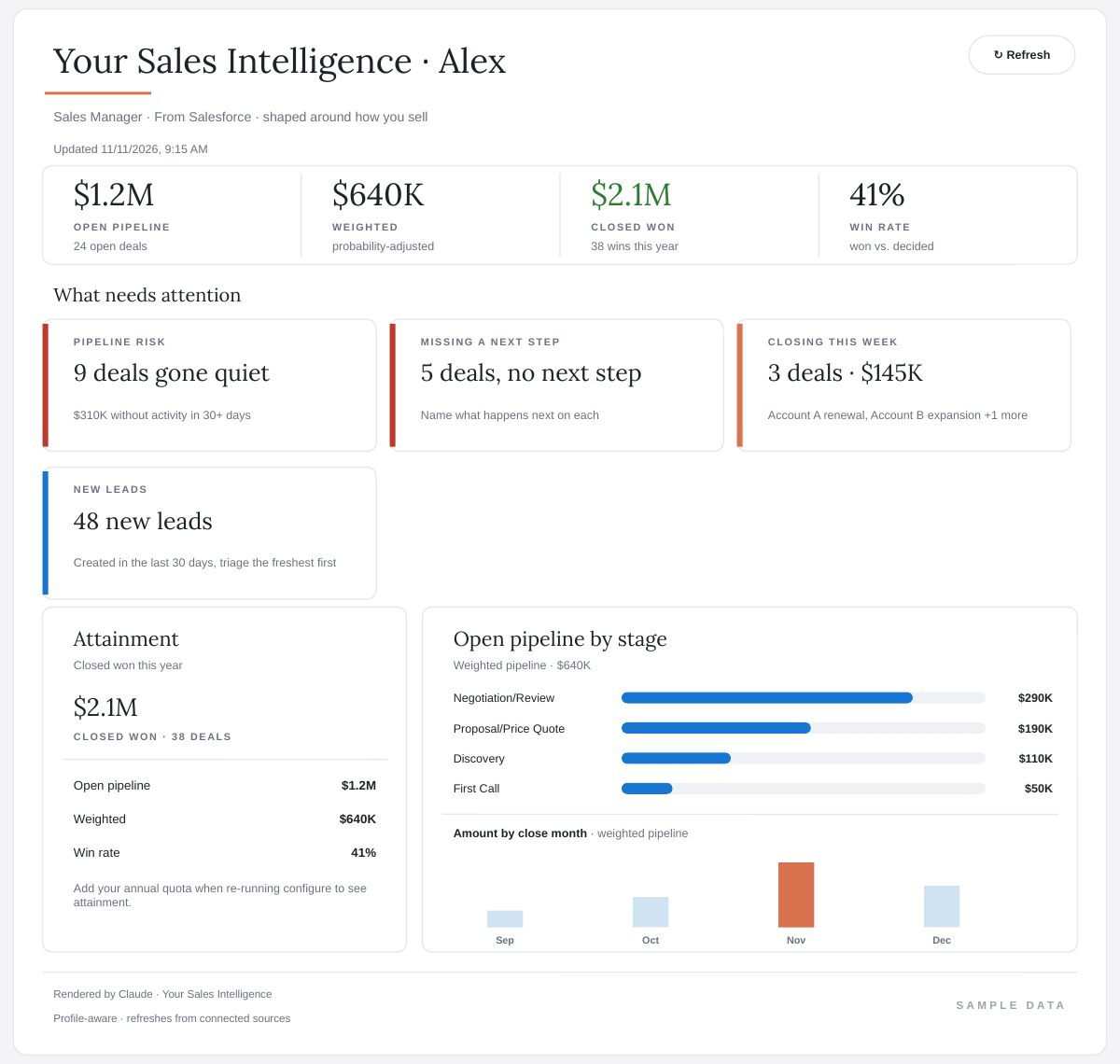
The dashboard the setup skill builds, called Your Sales Intelligence, has become the part we open most: a quick view of what is moving, and of which opportunities have gone quiet and need an update.
What came back thin, and why
Some skills returned little or nothing, and in every case the reason was in our org, not in the plugin.
- Activity and calendar. Skills that read tasks, events and meeting history had almost nothing to work with, because most of our day-to-day contact happens in email and meetings that are not logged in Salesforce.
- Email. Skills that sweep an inbox or learn a writing style need an email connector, which we had not connected.
- Forecast. With no quotas loaded, the forecast skills could report amounts and movement but not attainment.
This is the most useful thing to understand before a pilot. Salesforce in Claude reads exactly what is recorded. Where the record is complete, the answers are specific. Where people work outside the CRM, the skills have nothing to say, and the gap is in the team’s habits, not in the tool. It is the same gap that opens when knowledge lives with people rather than in the system, which is what we write down before a Salesforce admin leaves.
The plugin is only as good as what your team records. That turns out to be the most useful thing about it.
What it found that we were not looking for
Ask a model to audit your pipeline and it tells you what is true, which is not always what you expected. On our own org, a handful of plain questions surfaced:
- Open opportunities whose close dates had already passed, still sitting in early stages.
- The same inbound lead recorded several times, created by repeated submissions of the web form. This one came up while it was prioritizing leads; nobody had asked about duplicates.
- A customer whose annual service agreement comes up for renewal next year, with no renewal opportunity open yet.
None of this was hidden. A report would have shown each of them. They had simply not been looked at, because each one only matters once someone looks, and the plugin looks at everything it is asked about. It is the pattern we keep describing for clients: data that was right when it was entered and has not been maintained since. It shows up in our org too, and an assistant that reads every field literally is a fast way to find it.
Each of those has a small fix. What matters is how they were found: in an afternoon, by asking ordinary questions.
Once it is connected, it is always there
The moments it earns its place are often unplanned. Asking Claude for help drafting a reply to a customer who wanted to know about their support hours, it went to Salesforce on its own, pulled the actual figures, and turned a generic draft into a precise answer.
That is how a connected assistant works: once Salesforce is connected, Claude can go and find whatever it needs to answer, without being told to. Most of the time that is exactly the point. It is also the clearest argument for getting permissions right before anyone connects. Claude sees what the signed-in user sees, so whatever a user can reach in Salesforce can end up in any conversation, including a draft to a customer. If a user can see more than they should, so can the assistant working on their behalf.
For a pilot, attach it to a moment in the day. There are two natural anchors: the daily-briefing skill, which answers “what needs my attention today?” from the pipeline, the calendar and the inbox, and the Your Sales Intelligence dashboard. Pick one, use it every morning for two weeks, and judge it after that.
One answer, many formats
One thing impressed us more than we expected: the answer does not have to stay in the chat. This is Claude’s own capability rather than the plugin’s, so it is there with a plain Salesforce MCP connection too. The same pipeline question can come back as a widget in the conversation, as an interactive dashboard (Your Sales Intelligence is one), as a PowerPoint for Monday’s pipeline meeting, as a Word document or a PDF for an account review, or as a spreadsheet someone keeps working on. On Team and Enterprise plans, an interactive artifact can be shared with colleagues inside the organization.
The two kinds of output behave differently, and that matters for governance. A shared artifact that pulls live from a connected app uses each viewer’s own connection, so a colleague sees only what their own Salesforce access allows (Claude’s dashboards shared with live sharing are the documented exception). A deck, a PDF or a spreadsheet is a copy: it carries whatever the person who made it could see, and Salesforce’s sharing rules do not travel with the file. Decide which numbers are fine to leave Salesforce as a file before the first deck goes out.
How to ask it
A few habits made the difference between a vague answer and a useful one:
- One question, one skill. The plugin routes on intent. Put two requests in one sentence and it picks one.
- Name the record. “Review my deals” gets something generic. “Review the renewal at this account” gets the right skill and the evidence behind it.
- Ask for a visual when the answer is a number. Adding “show me that as a widget” turns a paragraph of figures into a card people can read from across a room.
- Stay on one account. Four related questions about the same account show more than twenty unrelated ones.
If you are considering the beta
What we would do, in this order:
- Audit permission sets first. Claude inherits exactly what each user can see and do, so whatever is over-permissioned today is over-permissioned in Claude tomorrow. It is the first of the decisions we make before an AI gets write access.
- Fix the fields the skills read. Stage, close date, next step, contact roles and renewal fields carry most of the answers, and whether each field still means something to somebody decides how good those answers are.
- Start read-only, with approvals on, for a small group, and agree three outcomes you will review weekly.
- Name an owner who approves connections and watches usage.
Also check which skills your build has. The version we installed in early October listed 32 workflow skills; a month later it lists about 40, including account plans, logging activity, scheduling meetings and summarizing call transcripts. Salesforce’s own page says 37. The count is moving, so look at yours rather than at the announcement.
Thinking about the beta?
We can run the readiness work with you, from permissions and field quality to a read-only pilot with a small group.
What is still unknown
Two questions decide the business case, and neither has a public answer yet. Salesforce has not published a price for the plugin; the Claude side needs a paid Claude plan. And Salesforce has documented that successful calls from registered external agents over MCP and API will be metered in Flex Credits, targeted for November, with the rate still to be announced and 30 days’ notice before metering starts. It has also said that any use of a Salesforce MCP server, which is how Salesforce in Claude connects, will require agent registration within three months of its notice, for all customers. It has not said specifically how metering applies to Salesforce in Claude.
Waiting for those answers before a production rollout is a reasonable decision. Waiting on the readiness work is not: permissions, field quality and activity logging pay off whether or not the plugin ever goes live.
Our view
Salesforce in Claude does what it says, and the setup is simple. The surprise was where the value came from. The answers were only as good as our records, and the most useful hour we spent with it was the one in which a few plain questions showed us which of those records had stopped being true.
That is the case for starting the readiness work now, even if you wait on pricing. The questions it could not answer for us pointed at the same short list every time: permissions, the fields the skills read, and activity nobody logs. That list decides whether any AI works in your org, because the foundation, not the model, decides whether AI works.
Sources
Read at the vendors’ own pages on November 11, 2026. Everything else in this article comes from our own use of the beta on our own org.
- Salesforce, Claudeforce: the partnership, the 37 skills Salesforce lists, the clouds marked coming soon, and how permissions apply.
- Claude Help Center, Set up Salesforce in Claude for your organization: the External Client App, the connector and the setup skill.
- Claude Help Center, Create and edit files with Claude and Share artifacts: the file formats Claude produces, and how shared artifacts use each viewer’s own connections.
- Salesforce Help, Understand AIforce Impact (KA 005360285): agent registration and Flex Credits metering for MCP and API calls.