 SkyPlanner
For twenty years, connecting anything to Salesforce meant a project. Middleware, field mapping, a service account, a go-live date. That is no longer true, and the interesting part is what it leaves behind.
A client asked us recently what it would take to let their team ask questions of their Salesforce data in plain language, from the tools they already work in. Five years ago that scope would have started with an integration architecture and a number with a comma in it.
The honest answer now is that the connecting part is close to trivial. What is not trivial is deciding what to connect it to.
That inversion is the whole story, and it is easy to lose underneath the product announcements.
What actually changed
In April 2026, Salesforce made hosted MCP servers generally available for every Enterprise Edition org and above. Salesforce MCP had been in pilot since spring 2025 and in beta since that October.
MCP stands for Model Context Protocol. It is an open standard for how AI assistants talk to systems that hold real data. The useful way to think about it is not as a Salesforce feature but as a common plug. Before it, every AI tool that wanted to reach your CRM needed its own custom connection, built and maintained separately. With it, they all speak the same one.
A hosted MCP server is an endpoint Salesforce runs for you. It exposes chosen parts of your org, specific objects, flows, Apex actions, defined queries, to any AI client that speaks the protocol. Salesforce handles the hosting, the authentication and the permission enforcement. There is nothing to provision and no uptime to manage.
In practical terms: your Salesforce becomes something an AI assistant can talk to, in whatever tool your team already lives in, without anyone building a bridge first.
The old shape of this problem
It is worth being precise about what has gone away, because the difference is not incremental.
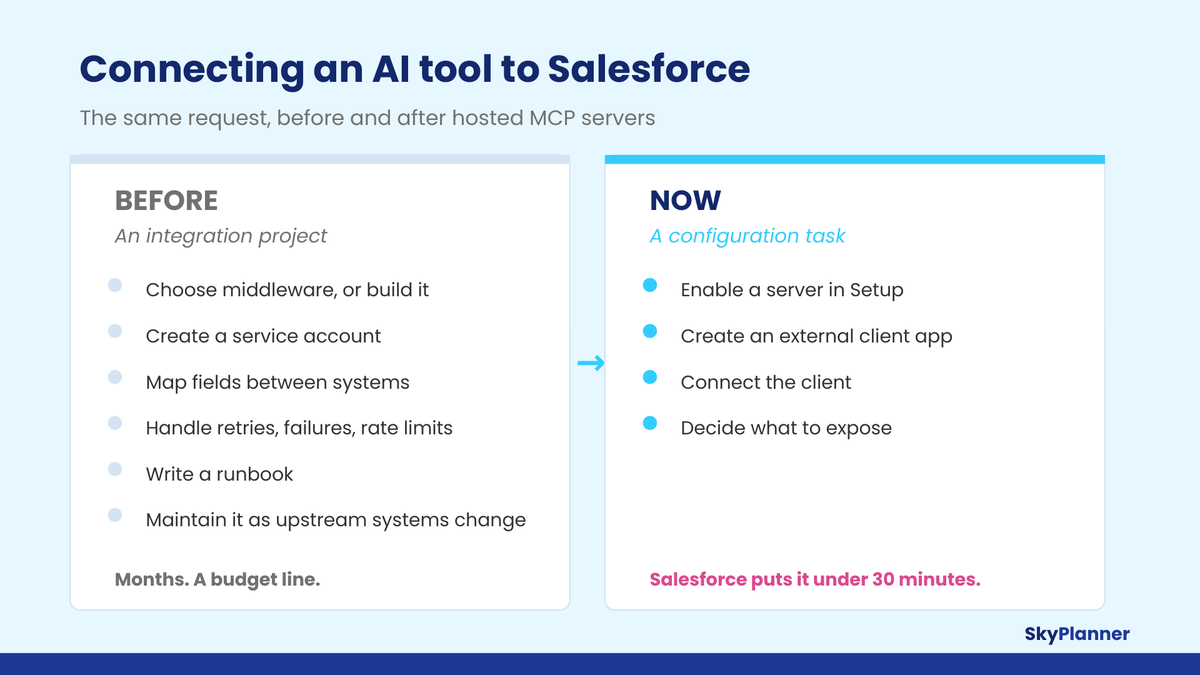
The old version was a build. You chose middleware or wrote the integration yourself. You created a service account and negotiated its permissions with someone in security. You mapped fields. You handled retries, failures and rate limits. You wrote a runbook. Then you maintained all of it, and it broke roughly whenever anything upstream changed.
The new version is a configuration task. You enable a server in Setup, create an external client app, and connect the client. Salesforce puts the whole path at under thirty minutes, and in our experience that is not marketing. The first working connection genuinely takes an afternoon, including the reading.
Which means the months of effort that used to go into building the connection are now available for something else. The question is whether teams spend them on the decisions, or simply move faster into a worse position.
The change that matters most is not the protocol
If you read one section of this piece, make it this one. The technically interesting part of MCP is the standardization. The consequentially interesting part is a quieter change in how access works.
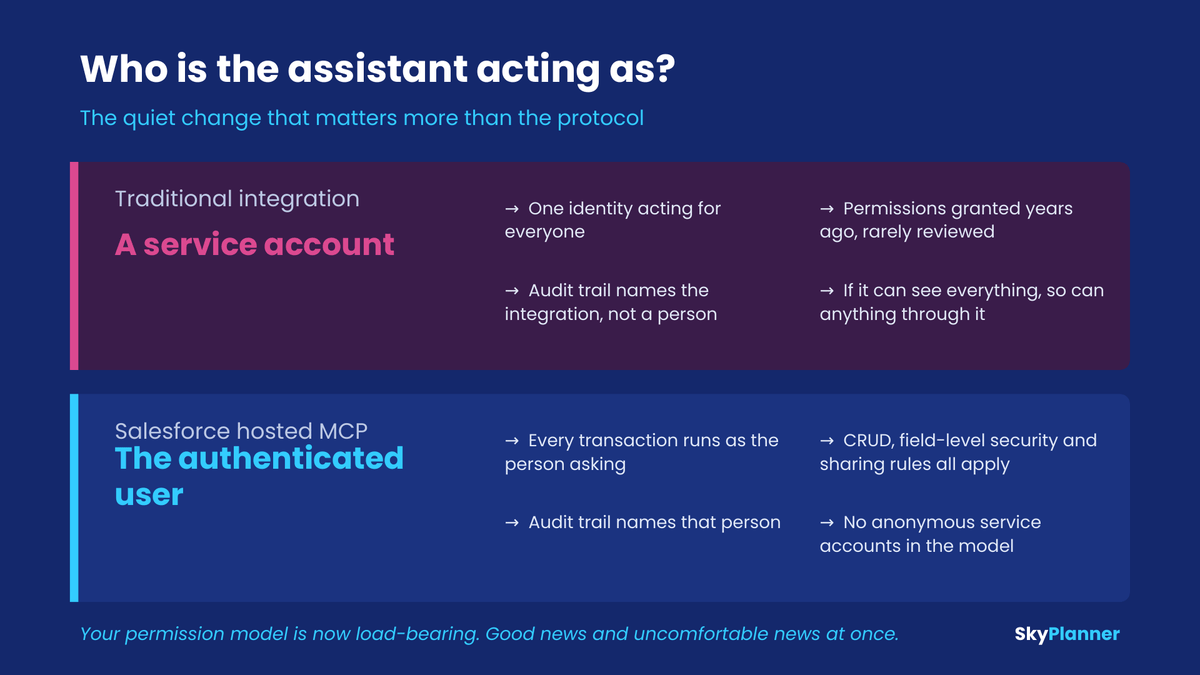
Traditional integrations run as a service account. A single identity, usually created years ago, usually with broader permissions than anyone currently remembers granting, acting on behalf of everyone. When that integration writes a record, the audit trail says the integration did it. If it can see everything, then so can anything connected through it.
Salesforce MCP does not work that way. Every transaction runs as the authenticated user. CRUD, field-level security and sharing rules all apply exactly as they already do for that person. Access is controlled with OAuth and PKCE, and there are no anonymous service accounts in the model at all.
Update. That model is changing for agents that connect from outside Salesforce. Salesforce has announced that external agents, whether they use MCP or the API, will be registered on the platform with their own identity and their own, narrower permission set, instead of acting as the person they assist, and that their calls will be metered. The point of this section holds, arguably more strongly: what an assistant can reach becomes an explicit decision about a named identity rather than something it inherits from whoever is asking. Salesforce explains the change in Understand AIforce Impact.
Two things follow from that, and both are worth saying out loud in your next internal meeting.
The good news. The assistant cannot see anything the person asking could not already see. Your existing permission model, the one your admins have spent years tuning, is doing the work. If the agent updates a record, that person’s name is in the audit trail. Nobody has to learn a new security model or trust a new one.
The uncomfortable news. Your permission model is now load-bearing in a way it has never quite been before. If a user has read access to a field that nobody realized they had read access to, they have probably never noticed, because finding it would have meant clicking through to an obscure page layout. An assistant will surface it in a summary the first time it is relevant. Over-permissioning that was theoretical for years becomes visible in week one.
That is not an argument against connecting anything. It is an argument for looking at your permission sets before you do, rather than after somebody pastes a surprising answer into a channel.
How granular the exposure actually gets
The other thing worth understanding before you scope this is that “connect AI to Salesforce” is not one decision. The platform ships several pre-configured servers with deliberately different capabilities, and you choose.
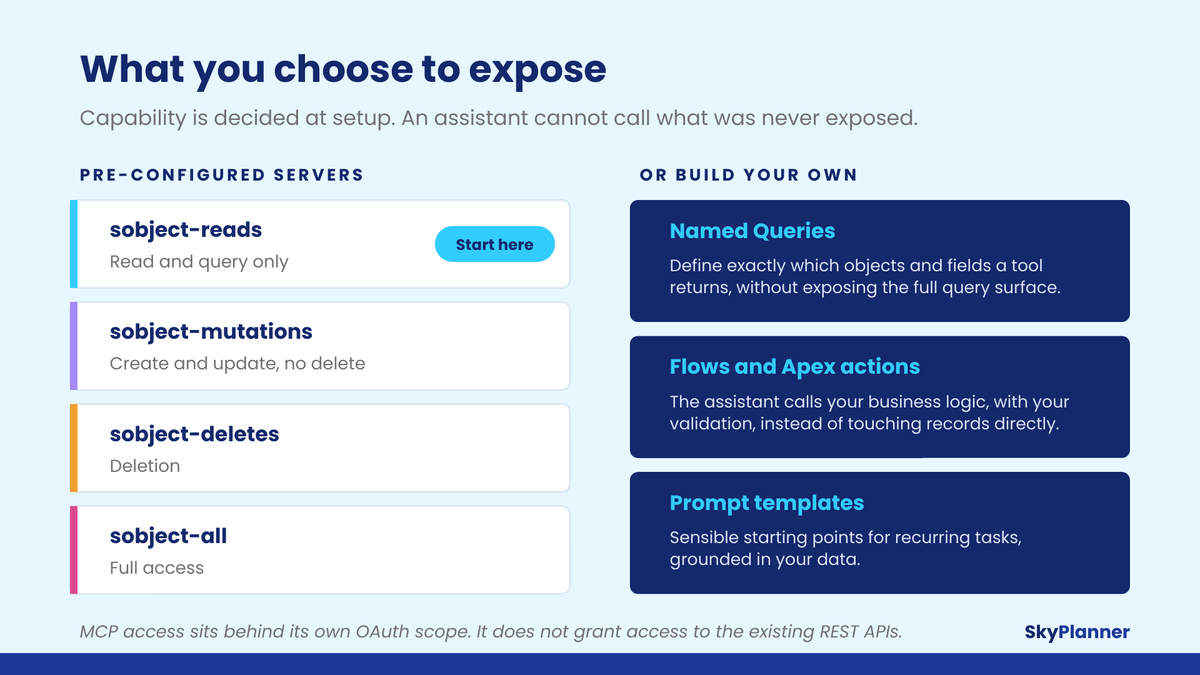
The pre-configured SObject servers split along the obvious fault line: sobject-reads is read and query only, sobject-mutations allows create and update but not delete, sobject-deletes covers deletion, and sobject-all is full access. Enabling one and not the others is a real, enforced boundary rather than a policy you hope people follow.
Beyond those, you can build custom servers that expose exactly what you want:
- Named Queries let you define precisely which objects and fields a given tool returns. This is the option most teams should be reaching for and mostly are not. It lets an assistant answer questions about a specific slice of your data model without exposing the full query surface of your org.
- Flows and Apex Invocable Actions can be exposed as tools. This matters more than it sounds: it means the assistant calls your business logic, with your validation and your side effects, rather than manipulating records directly and hoping the outcome matches your process.
- Prompt templates give people a sensible starting point for recurring tasks, grounded in your data rather than in whatever the user happened to type.
There is also a structural safety property here that is easy to miss. The server defines exactly which operations exist. An assistant cannot call something that has not been explicitly exposed, because from its point of view that operation is not there. This is meaningfully different from handing something an API key and a permission set and trusting it to stay inside the lines. Salesforce also put MCP access behind its own OAuth scope, so granting it does not grant access to the existing REST APIs.
The questions we got when we showed it
We built a prototype for a training and education organization that wanted to see what this looked like against their own data: a read-only connection to a sandbox, and an AI client asking questions of their Salesforce data in plain language. Deliberately unglamorous. It took an afternoon.
The demo was not the interesting part. What was interesting was what the room asked once they had seen it work, because the questions were sharper than the ones usually asked at this stage. All four are worth borrowing.
“What can it actually see, and how do we limit that?” This came within about a minute, and it is the right first question. Not what it can do. What it can see. Everything else follows from the answer: which objects, which fields, which records, and whether those limits are enforced by the platform or merely written down somewhere and hoped for.
“How do we teach it our vocabulary?” Their programs, their stages, their definitions of who counts as active. A model that understands Salesforce generically does not know what your organization means by any of those words. This is the question we think most predicts whether a deployment turns out to be useful, because a technically correct answer expressed in the wrong vocabulary is still a wrong answer, and it is wrong in a way that is hard to notice. The mechanism is injecting your definitions as context, alongside the rules about what the assistant must never do.
“Can we start read-only?” They raised this themselves, before we suggested it. Worth noting, because the standard assumption is that clients push for write access while the partner applies the brakes. In our experience it is frequently the other way round, and the caution is better informed than people expect.
“Where do the answers go?” The one we did not anticipate. An answer sitting in a chat window is useful exactly once. The real question was about outputs: whether a response can land in a document, a spreadsheet, a report somebody else reads, or attached to the record it came from. It is a fair question, it is often the difference between a demo people enjoy and a tool people use, and it changes what you decide to build.
None of these are questions about the protocol. All four are questions about scope, language and workflow, which is precisely the point.
The work moved, it did not disappear
Here is the part we would want a client to hear before signing anything.
The effort that used to go into building and maintaining an integration has not evaporated. It has moved upstream, into decisions that used to be made implicitly and now have to be made explicitly:
- Which objects and fields should be reachable, named rather than assumed.
- Whether your permission sets actually reflect what people should see today, or what somebody configured in 2021.
- What your business terms mean, precisely enough that an assistant answering in plain language does not create three versions of the truth.
- Whether the assistant should manipulate records directly or call your existing flows and actions.
- What, if anything, it should be allowed to change, and what has to stay read-only.
None of these are hard questions. They are, however, questions that a middleware project let you postpone for six months. Now they arrive on day one, which is better, but only if somebody is ready for them.
This is also why the projects that go badly are rarely the ones that hit a technical wall. They are the ones where the connection worked immediately, nobody had decided what should be exposed, and the scope grew by default until somebody senior asked an uncomfortable question.
What Claudeforce changes, and what it does not
While we were finishing this piece, Salesforce and Anthropic announced Claudeforce (August 26, 2026). It is worth addressing directly, because it is the largest thing to happen in this space since the April GA, and because it sharpens the argument above rather than contradicting it.
The headline is Salesforce in Claude, a plugin with 37 prebuilt sales skills covering meeting preparation, deal health review and pipeline review. An administrator connects it once, permissions are managed centrally, and every seller on the team has access from day one. Claude also becomes a reasoning model inside Salesforce’s own agent platform, and the default model in Slack. Sales Cloud in Claude opened for beta requests at Dreamforce on September 15, 2026, after a pilot that included Deloitte, GitLab and Legora. Access is requested through AgentExchange and approved requests receive activation instructions.
The detail worth noticing is how Salesforce describes the plumbing underneath. The announcement credits AIforce, its harness that brings business data and workflows to any agent, in Salesforce’s own words, “through MCP servers, APIs, and CLI tools.” The protocol this article is about is the substrate the packaged product runs on.
So what changes? For sales teams working inside Claude, a good part of the setup described here is now shipped for you. That is genuinely useful and we would not pretend otherwise. If your use case is sales and your people already live in Claude, the beta is open to request and worth putting in for.
What does not change is everything this piece is actually about. The prebuilt skills cover sales, inside one client, in beta. Service, finance, operations, your custom objects and your own vocabulary are still yours to define. And the decisions are identical either way: which objects and fields should be reachable, whether your permission sets reflect what people should see today, what your business terms mean precisely enough to answer with, and what stays read-only. Those four, and the two more that only matter once writing is on the table, are what we work through in AI guardrails in Salesforce.
Installing a plugin does not exempt you from those decisions. It gets you to the moment you need to have made them considerably faster.
Where to start
If you want to find out what Salesforce MCP is worth in your own org without committing to anything, there is a genuinely low-risk path.
Enable the platform/sobject-reads server in a sandbox. It is read-only, so nothing in your org can change. Connect one AI client. Give it to three or four people who know your data well, and let them ask the questions they actually have, for two weeks.
You will learn three things quickly: whether the answers are good enough to be useful, where your data or definitions fall apart under direct questioning, and which use cases people invent that nobody put in the original scope. In our experience the third one is usually the most valuable, and never matches the business case written beforehand.
Then, and only then, have the conversation about write access. We wrote separately about why the foundation, not the model, decides whether AI works in a Salesforce org, and that argument applies with more force here, not less, precisely because the technical barrier is now so low.
Thinking about connecting an LLM to your org?
The scoping conversation is the part worth getting right, and it is shorter than most people expect. We will tell you honestly whether your org is ready and what we would connect first.
Our view
There is a version of this moment that goes badly, and it does not look like a security incident. It looks like a dozen teams each connecting an assistant to production because it was easy, nobody writing down what was exposed, and a year of quiet inconsistency before anyone notices.
There is also a version that goes well, and it is not more cautious. It is just more deliberate at the start. The same afternoon of setup, preceded by a week of deciding what should be reachable and what your terms mean.
We think MCP is the most consequential thing to happen to Salesforce integration in a decade, and we would say that even though it removes work we used to be paid for. The connection is no longer the hard part. That is genuinely good news. It just means the hard part is now the part that was always more important.
For what it is worth, this is the thinking behind PilotIQ, our own assistant that runs inside Salesforce: the same conviction that what an assistant is allowed to reach matters more than how clever it is.
Sources
- Salesforce Newsroom, Salesforce and Anthropic Announce Claudeforce (August 26, 2026). Partnership scope, the Salesforce in Claude plugin, and availability.
- Salesforce Developers, Salesforce Hosted MCP Servers Are Now Generally Available (April 29, 2026). GA announcement, security model, and setup path.
- Salesforce Developers, Hosted MCP Servers documentation. Pre-configured servers, named queries, and custom server configuration.
- Salesforce Developers, Expose Custom Apex as a Hosted MCP Tool for Agents (May 2026).
- Model Context Protocol. The open standard specification.