 SkyPlanner
An AI-ready Salesforce org is less about the model you choose than the foundation underneath it. Most AI initiatives don’t fail because the technology is weak; they fail because the org was never prepared. Here’s how we think about readiness, and what we look at before anything is switched on.
Almost every Salesforce team we talk to is somewhere on the AI question. Some are evaluating. Some have run a pilot that impressed everyone in the demo and quietly went nowhere. A few have something in production and are trying to work out why the results are uneven.
The conversation usually starts with the same question: “which AI should we use?” The technology is genuinely good now. What separates the organizations getting real value from the ones stuck in pilot purgatory is something much less exciting: whether their Salesforce org was ready to support AI in the first place.
This is the single most useful thing we can tell anyone starting this journey, so we’ll say it plainly:
AI doesn’t fix a messy org. It inherits it, and then acts on it at speed.
That’s not a reason to wait. It’s a reason to start in the right place.
The gap between ambition and foundation
This isn’t just our observation from the field; it shows up clearly in the research. In Salesforce’s State of Data and Analytics study, 84% of data and analytics leaders say their data strategies need a complete overhaul before their AI ambitions can succeed (Salesforce newsroom, November 2025). At the same time, 67% feel pressure to implement AI quickly. Those two facts pulling against each other explain a great deal of what we see in real orgs.
The consequences are already measurable. Among organizations with AI in production, 89% say they have experienced inaccurate or misleading AI outputs, and 42% lack full confidence in the accuracy and relevance of what their AI produces. Leaders themselves estimate that 26% of their organizational data is untrustworthy, according to the same Salesforce study.
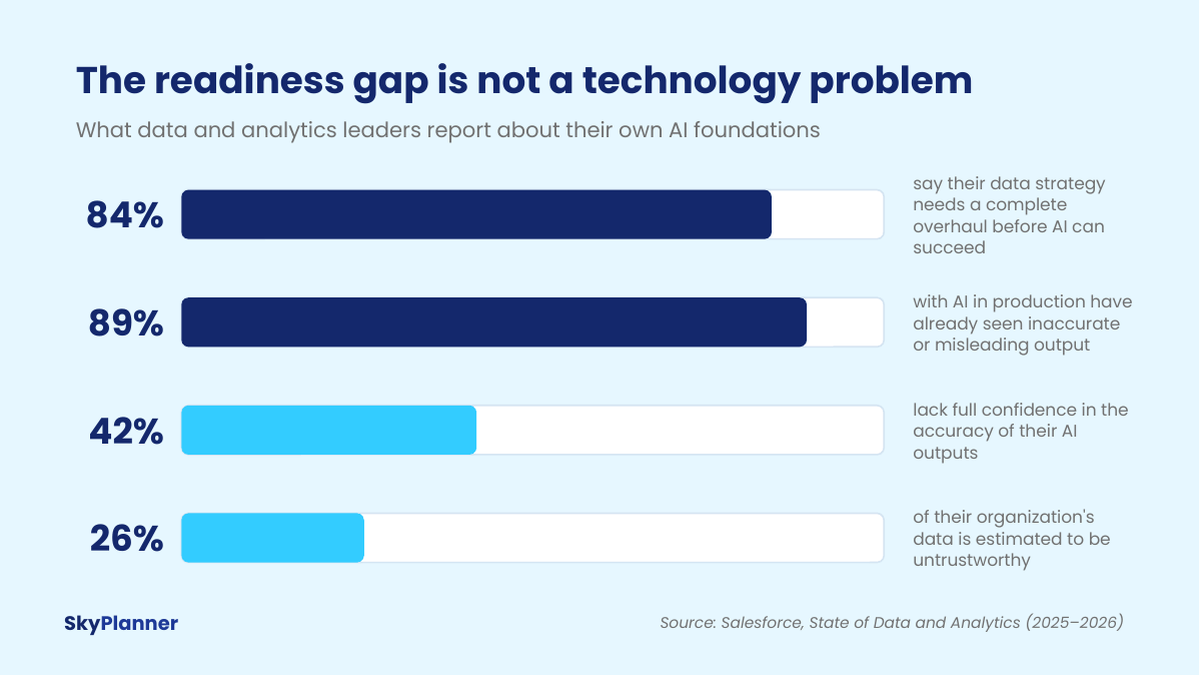
Read those numbers together and a picture forms that matches what we find when we open a Salesforce org. The ambition is real, the pressure is real, and the foundation underneath is thinner than anyone expected. Notably, 89% of those same leaders say a strong data foundation is the most critical factor for successful AI. So this isn’t a knowledge gap. It’s a sequencing problem.
Our position: AI inherits your organization
When you introduce AI into Salesforce, you are not adding an independent expert who arrives with its own judgment. You are giving something fast and literal access to the environment you already have. It adopts your org, assumptions, gaps and all.
We think about it in four parts.
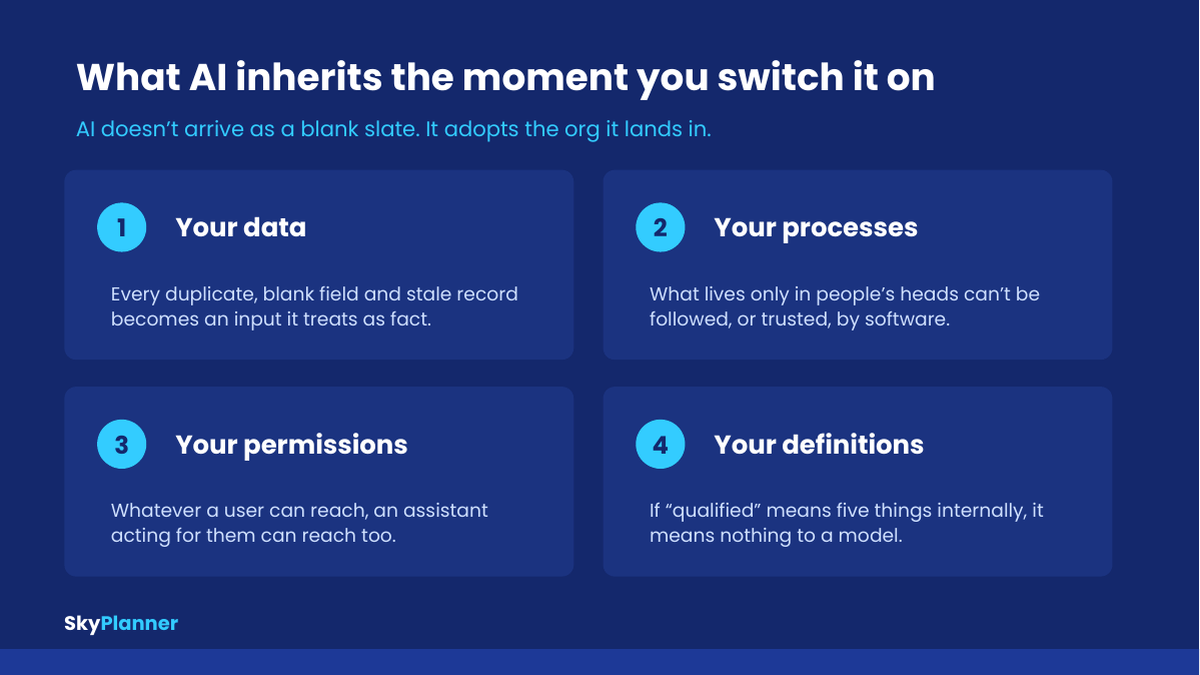
Your data. A duplicate account is not a minor annoyance to an AI assistant; it is two conflicting truths. A blank field isn’t “unknown,” it’s absent from the answer. A record last touched fourteen months ago is presented with the same confidence as one updated this morning. Salesforce’s research puts a number on how widespread this is: leaders estimate 19% of company data is siloed, inaccessible or otherwise unusable, and 70% believe their most valuable business insights live inside that inaccessible portion, per the same research. Some of that is fragmentation at a scale most people underestimate: the average large enterprise runs around 897 applications, with only 29% of them connected (MuleSoft Connectivity Benchmark).
Your processes. Most teams have two versions of every process: the documented one and the real one. People navigate the gap with judgment and hallway conversations. Software cannot. If the real qualification process lives in a senior rep’s head, an assistant has nothing reliable to work from. In our view this is the most commonly missed readiness issue of all, and it long predates AI.
Your permissions. AI acting on behalf of a user operates within that user’s access. That is exactly as it should be, and exactly why unclear permissions become a genuine risk the moment AI can act rather than just answer. Deciding what it may reach, and what it must never do, is its own exercise: we wrote up the six decisions in AI guardrails in Salesforce. Only 43% of data and analytics leaders have established formal data governance frameworks and policies, while 88% agree AI demands entirely new approaches to governance and security, Salesforce found. That distance between what’s needed and what exists is where avoidable incidents happen.
Your definitions. If “qualified lead,” “active customer” or “at risk” mean different things to marketing, sales and service, the AI will faithfully reproduce that confusion at scale, and everyone will conclude the AI is wrong, when in fact it was precise about something that was never agreed.
The uncomfortable part: AI doesn’t just reveal these problems. It acts on them, quickly, in front of customers.
Why this is good news
It would be easy to read all of that as discouraging. We read it the opposite way, for a simple reason: every one of these problems is fixable, and none of them require you to wait for better technology.
Data quality, documented process, clear access rules, agreed definitions: this is ordinary, well-understood Salesforce work. It is not glamorous and it will never be the subject of a keynote. But it is the work that determines whether the exciting part succeeds. Teams that do it don’t just get better AI results; they get a better CRM along the way, which pays off whether or not a single agent ever goes live.
It also reframes the timeline question we hear constantly: “are we too late?” No. The organizations pulling ahead are not the earliest adopters. They’re the ones who prepared properly and then moved deliberately.
Not sure if your org is AI-ready?
Our AI Enablement Services start with a readiness assessment of your Salesforce org: an honest picture of where you stand and what to do first.
What “AI-ready” actually means
“Readiness” is a word that gets used loosely, so here is what an AI-ready Salesforce org actually looks like. When we assess one, we look at five dimensions.
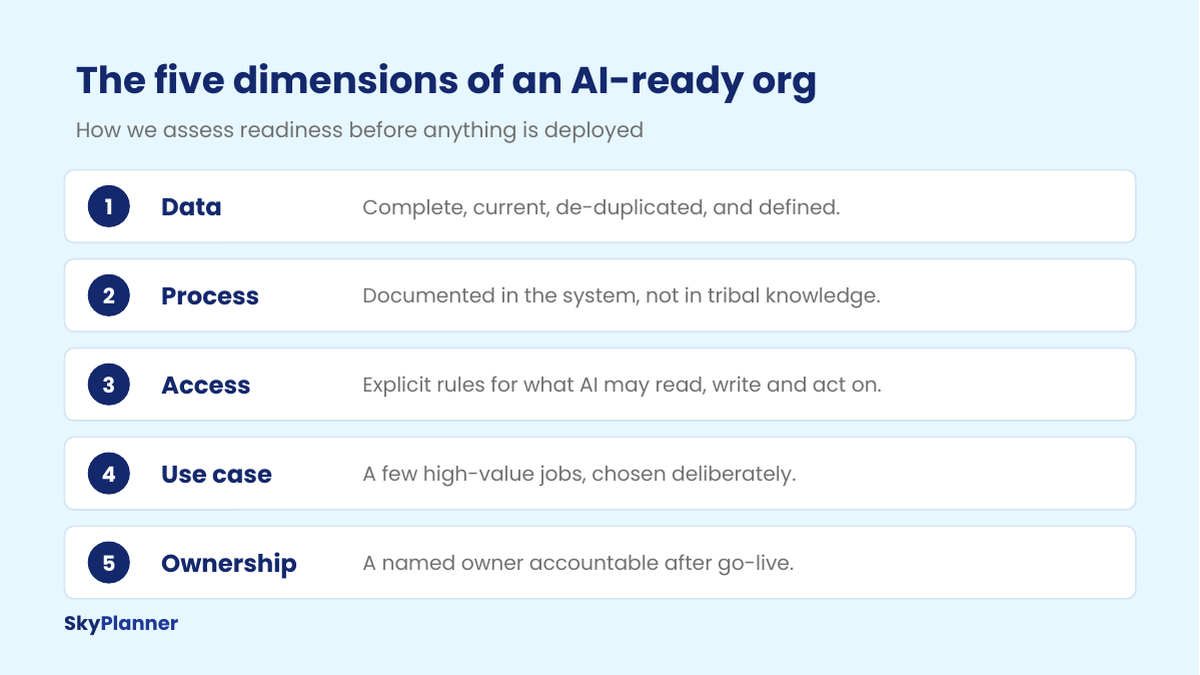
1. Data. Is it complete, current, de-duplicated, and defined? The last one matters most and gets checked least. If your team can’t agree what a field means, AI can’t either. Checking that one is less a cleanup than an ownership question, asked field by field, and we set out how to run it in data readiness for AI: who each field is actually for.
2. Process. Does the workflow that matters actually exist in Salesforce, or only in people’s habits? AI can only act on what is represented in the system.
3. Access. Have you decided explicitly what AI may read, what it may write, and what requires a human to approve? Deciding this before deployment is far easier than retrofitting it after an uncomfortable surprise. Since hosted MCP servers went generally available, these decisions arrive on day one instead of after a six-month integration project, and we went into how granular that exposure actually gets separately.
4. Use case. Have you chosen a small number of high-value jobs, or are you hoping to apply AI broadly and see what sticks? “AI everywhere” is the most reliable way we know to produce nothing in particular.
5. Ownership. Is someone accountable for the outcome after go-live: monitoring quality, tuning, and expanding what works? Deployments without an owner drift, quietly, until someone notices no one trusts the output anymore. Ownership also has to survive the person who holds it leaving, which is why we set out what belongs in a Salesforce admin handover.
Most orgs are strong in two or three of these and weaker in the rest. That’s normal. Knowing which is which is the whole point; it turns an intimidating, open-ended “AI strategy” into a short, concrete list of things to fix.
How we take an org from ready to running
Our approach follows the order we believe the work has to happen in. It isn’t complicated, which is rather the point.
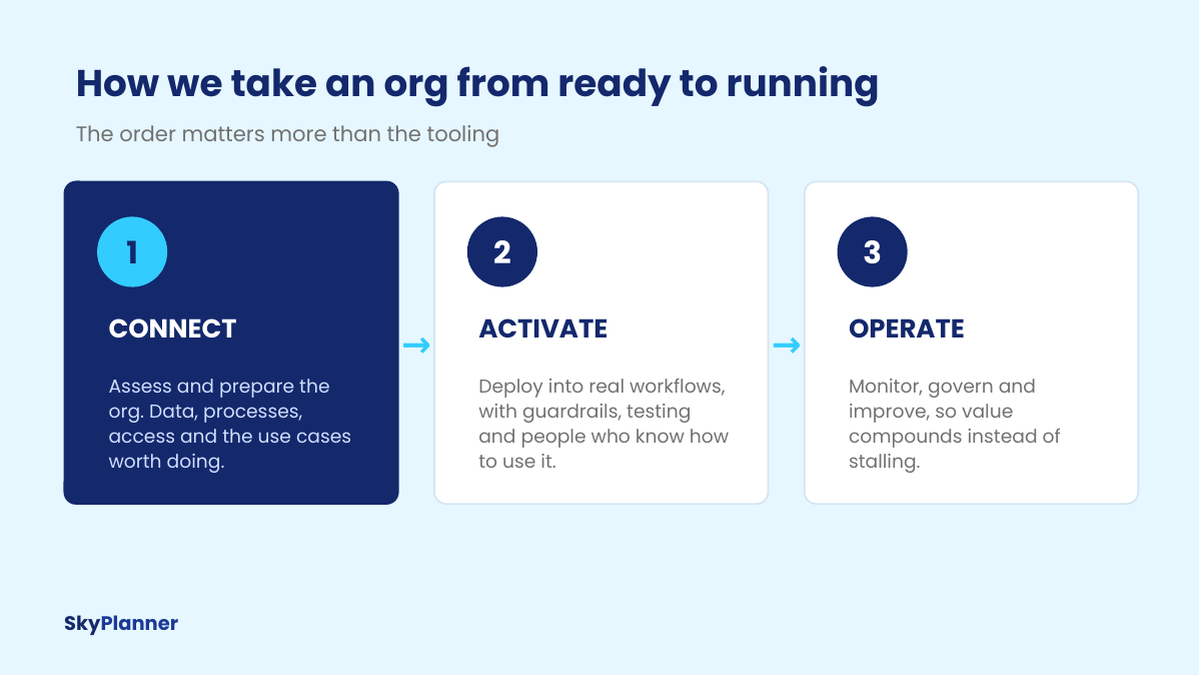
Connect is where readiness is established: we assess the org against the five dimensions above, map the data and process gaps, define access rules, and identify the two or three use cases genuinely worth doing. The output is a clear picture of where you stand and what to do first, useful regardless of what you decide to build afterwards.
Activate is where AI enters real workflows, configured for how your team actually works, with guardrails and testing against real edge cases, and with people trained to use and question the output rather than simply trust it.
Operate is the part most plans skip. AI is not a project that finishes; it needs monitoring, governance, tuning and gradual expansion. This is where value compounds instead of stalling, and it’s the phase that decides whether AI becomes part of how the company runs, or a story about that thing you tried once.
What this looks like when it works
The everyday reality of AI in a well-prepared org is quieter than the marketing suggests, and considerably more useful. A manager asks a question in plain language and gets an answer from live CRM data instead of waiting on a report. A rep walks into a call already briefed. A support queue arrives triaged. Nobody describes it as transformative in the moment; they simply stop losing hours to work that never needed a human.
There is real appetite for exactly this. In the same Salesforce research, 93% of business leaders say they would perform better if they could ask questions of their data in natural language, while 63% of data and analytics leaders say translating business questions into technical queries is prone to error. That gap, between the questions people have and the answers they can practically get, is the one we’ve spent the most time on.
It’s also why we built PilotIQ, our assistant that lives inside Salesforce so teams can ask questions and get answers where they already work. Building it made the point concrete for us. An assistant can only be as good as the data it can reach and the definitions it is handed: where fields are inconsistent or a term means three different things to three teams, the answer comes back fluent and unreliable. That isn’t a flaw in the assistant; it’s the org, reflected back. It is a large part of why we start with readiness rather than deployment.
Where to start this week
If you want to move without committing to anything, these are worth doing on their own merits:
- Pick one question you wish Salesforce could answer instantly, for example “which accounts went quiet this quarter?”, and try to answer it today. Whatever slows you down is your readiness gap, in miniature.
- Run a duplicate check on accounts and contacts. It’s the fastest signal you’ll get about the state of your data.
- Write down one core process end to end and compare it to what the system actually enforces. The difference is what AI would have to guess.
- Ask three people to define one shared term, “qualified,” for instance. If you get three answers, you’ve found something worth fixing before automating.
- Decide, on paper, what you would let AI do without approval. The conversation is more valuable than the document.
With Winter ’27, part of this list now has a Salesforce deadline behind it: we went through the three Winter ’27 release updates that decide AI readiness and what is worth checking now that the upgrade has arrived.
Our view
The technology question has largely been settled. The capability is here, it works, and it will keep improving whether or not any individual company is ready for it. What remains unsettled, and what will separate the organizations that get value from the ones that spend two years talking about it, is whether the foundation underneath can support it.
We find that genuinely optimistic. It means the outcome is within your control, and it starts with work you already know how to do. Sales leaders are clearly betting on this direction: in Salesforce’s State of Sales research, 94% of sales leaders using AI agents say they are essential to growth. The opportunity is real. The preparation is what makes it usable. Building an AI-ready Salesforce org isn’t glamorous work, but it is what makes everything after it possible.
If you’re weighing AI for your Salesforce org and want an honest read on where you actually stand, that’s what our AI Enablement Services readiness consultation is for: about 30 minutes, no obligation, and you leave with a clear picture either way.
Sources
- Salesforce, State of Data and Analytics. Full research report.
- Salesforce Newsroom, Study: 84% of Technical Leaders Need Data Overhaul for AI Strategies to Succeed (November 2025). Survey of 3,800 analytics and IT decision makers and 3,852 line-of-business leaders across 18 countries.
- MuleSoft, Connectivity Benchmark Report 2025. Survey of 1,050 enterprise IT leaders.
- Salesforce, State of Sales, 7th Edition. Insights from 4,050 sales professionals.